

Photon
Solana memecoin traders get live token feeds, charts, and one-click buys and sells in one browser tab.
Photon Solana Trading Terminal: Memecoin Trading, Fees And Chains
What is Photon?
Photon is a browser-based Solana trading terminal for memecoin traders, with live token feeds, charts, and one-click buy and sell on one screen.
Ready to try Photon?
Open the official site and get started in a few clicks.
Photon Overview
Photon is a Solana trading terminal that runs in the browser. It is built for memecoin trading, where an entry window can close in seconds. The live feed, charts, and buy and sell buttons all sit on one screen, so there is nothing to install and no Telegram bot to message.
The people who use it most are active Solana traders who trade by hand and move fast. If you watch new launches and want to act on them quickly, this fits. If you want a bot that trades for you or copies another wallet, Photon does not offer that. Copy trading and a dedicated mobile app are not part of the product today.
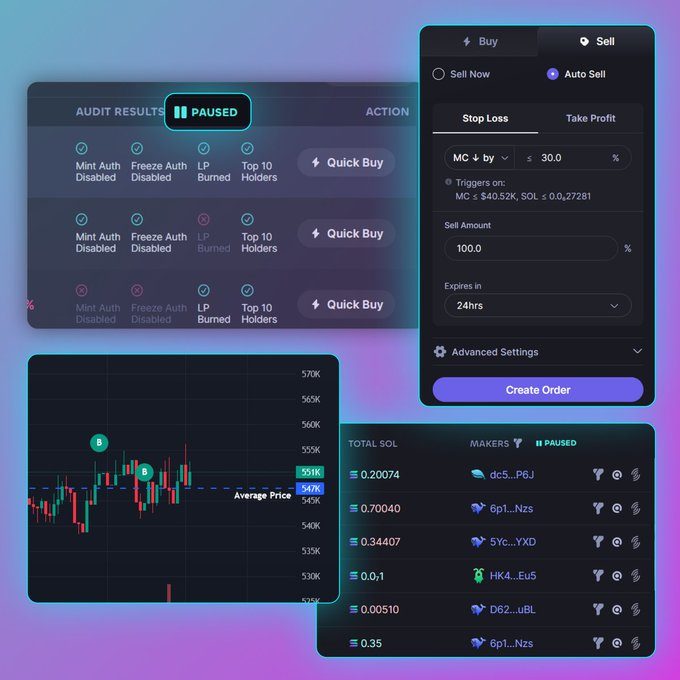
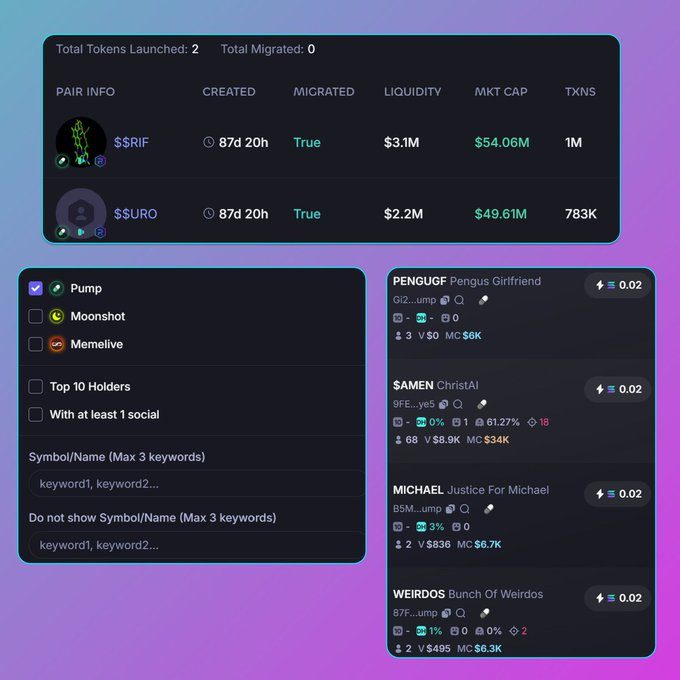
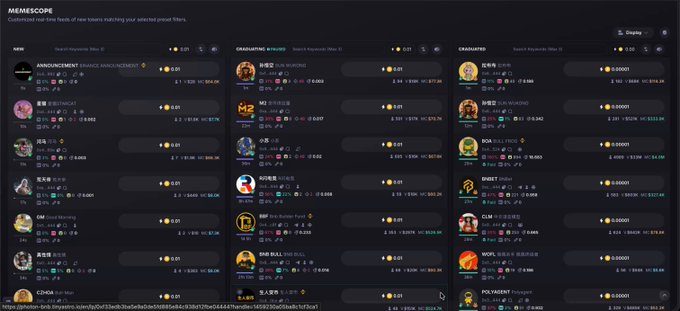
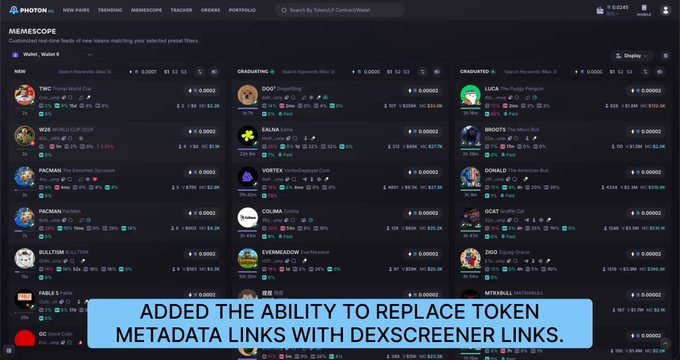
The main draw is Memescope, a near real-time feed of new pairs from launchpads such as Pump.fun and Moonshot. You filter tokens by top holder share, liquidity, volume, market cap, developer holding, and social links. Hover over a token and the feed pauses, so you can check it before you buy. That pause is a small feature, but the feed moves quickly, and it helps.
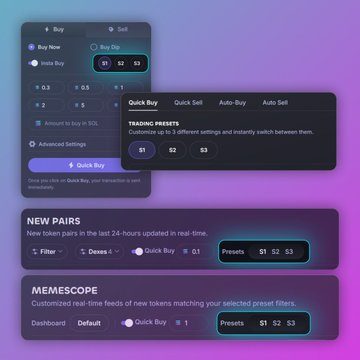
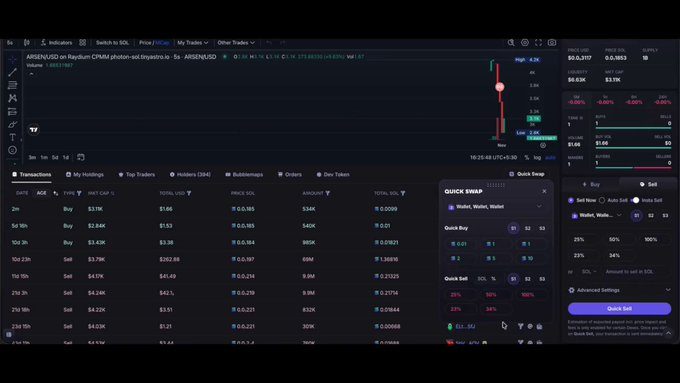
Trades run from saved presets. You set up three profiles, labeled S1, S2, and S3, each with its own slippage, priority fee, bribe level, and Smart MEV mode. A single click then buys or sells with those settings. You can also place limit orders on a percentage dip, a target market cap, or a line drawn on the chart. DCA orders split a buy or sell into timed parts. Stop loss and take profit orders expire after 24, 48, or 72 hours.
Photon supports more than one chain, but Solana gets nearly all the attention. BNB Chain and Base run on separate domains with a narrower feature set, so you switch sites to trade there. The platform does not publish a full feature comparison across chains.
Photon charges one percent on every successful buy and every successful sell, collected in SOL. A 5 SOL buy carries a 0.05 SOL fee. A round trip comes to about two percent before network fees, priority fees, bribes, and pool fees. Photon does not publish volume tiers, cashback, or a referral rebate that lowers that rate. Some rival terminals do offer those, and for a frequent trader the fixed cost adds up.
The useful parts are the speed of the single screen and the preset system. The costs are the flat fee and the lack of copy trading. If you already trade from a desktop browser and you trade often on Solana, Photon is worth a look. If you want the lowest fee or a phone-first setup, check other terminals first.
Photon Key features
-
Memescope Discovery Feed
Memescope streams new pairs from Pump.fun and Moonshot in near real time. Filters cover top ten holder percentage, bonding curve progress, liquidity, volume, market cap, developer holding, and social links.
-
One Click Buy and Sell
Three saved presets, S1, S2, and S3, store slippage, priority fee, bribe level, and MEV mode. A buy or sell uses the SOL amount or percentage from the chosen preset, so no numbers need retyping during fast moves.
-
Integrated Charting
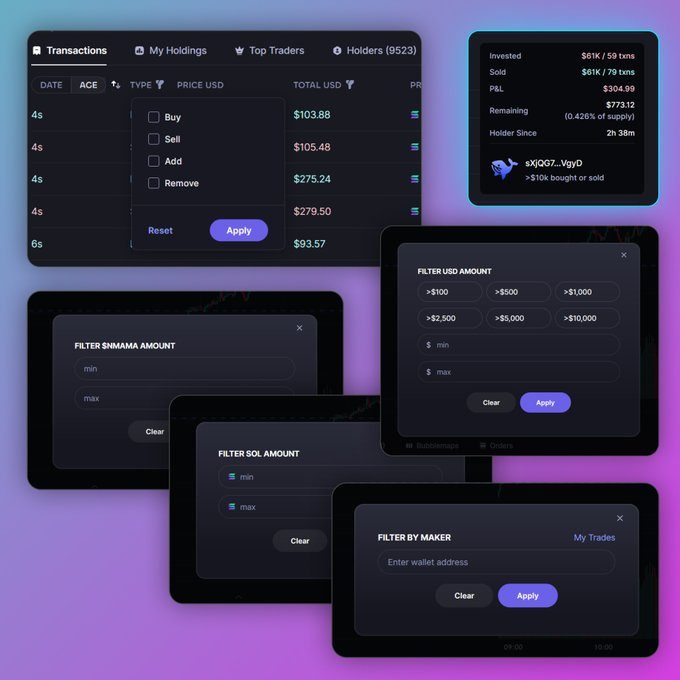
Charts show candlesticks, volume, recent trades, holder distribution, and top trader activity. Traders can draw target lines that feed into limit orders.
-
Limit Orders
Limit orders trigger on a percentage drop, an exact market cap, or a chart line target. Stop loss and take profit options expire after 24, 48, or 72 hours, and filling one side cancels the paired order.
-
DCA Orders
DCA splits a buy or sell into timed portions. Users set the interval, the number of portions, market cap bands, and an expiry.
-
Smart MEV Protection
Fast and Secure modes decide how bribes route, either directly to Jito or through a partner relay. Auto Speed and Default Speed adjust priority and bribe based on recent successful transactions.
-
Multi Wallet Support
Up to five active trading wallets can run at once. Deposits can be split, and buys or sells can fire from several wallets together.
-
Portfolio and Holdings
The holdings view lists invested, remaining, and sold amounts, plus profit and loss, for tokens traded through the platform.
-
Token Security Signals
Real-time checks show mint authority, freeze authority, liquidity burn, and tax status for each token.
-
Browser-Based Access
Photon runs in a web browser on desktop and mobile, so there is no app store download.
Photon Fees
-
Trading fee Photon charges a flat 1% on every successful buy and every successful sell, collected in SOL.
-
Transfer fee Wallet-to-wallet transfers inside the platform carry no Photon fee.
-
Priority fee and bribe You set the priority fee and Jito bribe yourself, and they go to validators or relays, not to Photon.
Photon Supported networks
 Solana
 BNB Chain
 Base
Base
How to use Photon
-
Open the official site
Type photon-sol.tinyastro.io into your browser yourself. Skip links from search ads and messages, since clone sites copy the interface and drain connected wallets.
-
Set up your wallet
Connect an existing Solana wallet such as Phantom, or follow the generated account flow to create a new Photon trading wallet.
-
Save your private key
Photon shows the trading wallet private key only once, so write it down or store it with a secure offline method. Do not share it with anyone.
-
Deposit SOL to trade
Send SOL to the trading wallet address shown in the interface. Keep only the amount you plan to trade in this wallet.
-
Set your presets
Fill in slippage, priority fee, bribe amount, and Smart MEV mode for S1, S2, or S3. Each preset applies across tokens, so you do not have to re-enter numbers during fast moves.
-
Make your first buy
Open a token from Memescope or search for one, pick a preset, and run a one click buy with your SOL amount. Check the holdings view afterward to confirm the position.
Photon Demo video
Photon Screenshots

Photon User Reviews
-
@ZEUS_solana_
View on X ↗
There's a reason why I continue to use photon to trade.
I've tested other trading platforms after hearing all the hype.
The user interface on this platform is unmatched, that's a big reason why I continue to win.
Try it for a day? You'll understand: -
@hnshah
View on X ↗
The @tradewithPhoton team has been building the fastest trading platform for Solana. I have been testing it as an early access user and am very impressed by the product @mintcollectible and team have built. It has product/market fit because it truly is the fastest way to trade on Solana. If you're trading on Solana, check it out asap. Happy to see the product available to everyone as of today. -
@shahh
View on X ↗
All the best traders I know use @tradewithPhoton
it's the best especially for new pairs, quick fills.
Even the people partnered with others use photon (secret hehe)
Trust me and try it out, literally nothing competes
Photon Review
Pros
- Memescope streams new pairs from Pump.fun and Moonshot, with filters for top ten holder share, liquidity, and developer holdings.
- Three saved presets, S1, S2, and S3, store slippage, priority fee, bribe level, and MEV mode so one click applies them.
- Limit orders can trigger on a percentage dip, an exact market cap, or a line drawn on the chart.
- Each trading wallet shows its private key once, so you can export it into Phantom or another wallet.
- Up to five trading wallets can fire buys or sells together from one screen.
- Real-time security signals show mint authority, freeze authority, liquidity burn, and tax status for each token.
- The trading runs in a browser at photon-sol.tinyastro.io, so there is no app to install.
Cons
- The flat 1% fee on each side makes a round trip cost about 2% before network fees, priority fees, and bribes.
- There is no native copy trading, Telegram bot, or dedicated mobile app.
- Discovery tools are strongest on Solana, and other chains run on separate domains.
- The team is anonymous, and public audit information is limited.
- Trades can fail during heavy congestion if the user sets priority fees too low.
- Clone sites that copy the interface remain a risk, so the domain must be checked every time.
- Volume and fee revenue have dropped from earlier peaks.
Our verdict
I think Photon suits daily Solana memecoin traders who stay in a browser. Each side costs one percent, so a round trip costs two percent before bribes. Photon can sign from that wallet, so keep only trading money in it. Clone sites copy the interface, and the team is anonymous. Lower fees, copy trading, or a phone app would change my mind.
Is Photon safe & legit?
Photon is run by Tiny Astro Inc., but the official materials name no founders or public team members. Its fee collection shows on public trackers, and the records show no confirmed platform breach. The main known risks are clone websites that copy the interface and drain connected wallets, and the fact that the platform can sign transactions from the trading wallet, so keep only trading money in it. The material provided has no independent community reviews, and the three posts in the brief are promotional praise, not proof of trust.
X account intel @tradewithPhoton
-
Based in Canada
-
Joined X September 2023 3 years ago
-
Username changes 1 rename last on Sep 7, 2023
-
Signup source Web
Public profile signals from X. Use as one input alongside other due-diligence.
Security scan checked Oct 22, 2026
- Google Web Risk Not flagged
- MetaMask Not flagged
- Phantom Not flagged
- ScamSniffer Not flagged
- EtherAddressLookup Not flagged
- Keplr Wallet Not flagged
Domain photon-sol.tinyastro.io checked against Google's lists of unsafe sites and public crypto wallet blacklists.
Photon FAQ
How much does Photon charge per trade?
Which blockchains does Photon support?
Who controls the trading wallet?
Is Photon safe to use?
How does Photon compare with other trading terminals?
Photon Updates
-
 Stonk, Pump and Meteora DBC assets are all now supported on Photon
1⃣400+ Quote Pairs
2⃣See Flywheel & Rewards indicators for Stonk tokens on Memescope & Token pages
3⃣Filter for Stonk tokens w/ 1 click- 69 replies
- 17 reposts
- 116 likes
- 62.5K views
-
NEW FEATURE ALERTS
We've just released several new features requested by our traders:
1️⃣ Added the ability to replace token metadata links with DexScreener links by enabling "DexScreener Links" under Settings → General.
2️⃣ Added the ability to display KOL Trades on the Charts page by enabling "KOL Trades" under Other Trades.
3️⃣ Added a new Multi Wallet Distribution mode, "Total Across Wallets," which treats the entered buy amount as the total amount and automatically splits it across the selected wallets using the configured variance.
4️⃣ Added a Quick Buy button to the simplified view in Wallet Tracking.
5️⃣ Added the ability to display the tracked creator wallet in Memescope.
Happy Trading 🚀- 44 replies
- 28 reposts
- 114 likes
- 53.7K views
-
JUST RELEASED – Photon SOL Updates
1️⃣ Switch displayed currency to SOL while trading with stables (USDC, USDT, USD1)
2️⃣ Toggle the agent filter and indicator on both Memescope and Token show page
3️⃣ See when fees were claimed on the chart by clicking on Other Trades and selecting Claim Fee- 75 replies
- 28 reposts
- 124 likes
- 28.1K views
-
Shield yourself from volatile SOL prices by trading directly with USDC & USD1 on Photon
Trade any pair in SOL/USDC/USD1 across all Quick Buy & Quick Sell menus- 75 replies
- 25 reposts
- 164 likes
- 85.3K views
-
JUST RELEASED - Photon SOL Updates
1⃣Royalty tooltip for Pump & Locked field
2⃣See which tokens originated from off-chain deployments
3⃣1/7/14/30-day PnL generation + instant PnL card by date
4⃣Migration line indicator on Token Page
5⃣CAD marker in wallet tracker feed for 1st buys
6⃣Unhide All button for hidden tokens
7⃣Select All/Unselect All options for Search and Memescope Filters
8⃣Simplified view for Wallet Tracker
9⃣Switch from USD to SOL in Wallet Tracking under SNAP
🔟BONK / Bonker tax visibility- 114 replies
- 63 reposts
- 232 likes
- 53.1K views
-
JUST RELEASED – PNL TRACKER W/ THE HIGHEST ACCURACY🎯
1⃣Start, stop & record your trading sessions in real-time
2⃣Select 1 or more wallet(s) to include in the tracker
3⃣See historical results of your most recent trading sessions
4⃣Easily share your PNL cards across any platform- 72 replies
- 75 reposts
- 183 likes
- 36.7K views
-
JUST RELEASED - Multi-wallet for Photon BNB
1⃣Create up to 10 active wallets to trade w/
2⃣Split evenly or distribute specific amounts from 1 wallet to multiple wallets
3⃣Buy/sell any token with multiple wallets simultaneously
4⃣Set limit orders for multiple wallets w/ 1 -click- 92 replies
- 25 reposts
- 147 likes
- 81.3K views
-
JUST RELEASED - Photon SOL Updates
1⃣Consolidate tokens across multiple wallets into one view.
2⃣See dev funding sources & amounts on Memescope
3⃣View Avg Buy and Avg Sell for filtered wallets
4⃣Support for Wen . dev Launchpad now added as new filter on Memescope- 110 replies
- 116 reposts
- 217 likes
- 53.6K views
-
JUST RELEASED - Photon BNB Updates
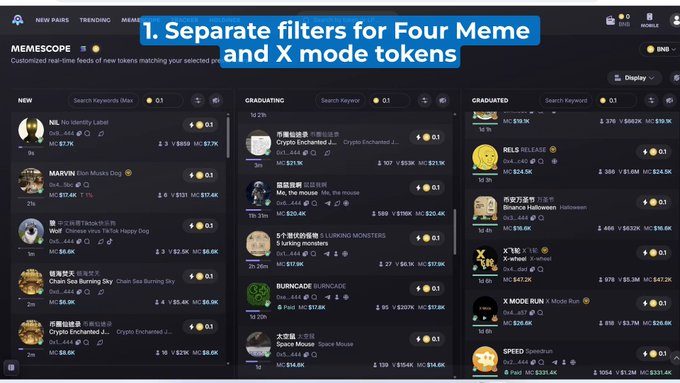
1⃣You can now buy X-mode tokens directly on Photon
2⃣Separate filters for Four Meme and X-mode tokens are now available on Memescope, Trending and New Pairs
3⃣Tax for tokens is now displayed on both Memescope and Token page (under Data & Security tab)- 233 replies
- 139 reposts
- 225 likes
- 57.7K views
-
大家好 - Auto-translation is now available on Photon BNB🚀🚀🚀
- 109 replies
- 67 reposts
- 402 likes
- 74.2K views
-
JUST DROPPED – Photon BNB UPGRADES
1⃣Memescope 2.0 for BNB
2⃣Fully customize any data point in any order
3⃣Big Quick buy button + multiple quick buy amts
4⃣Socials + website filter
5⃣Sound noti’s per feed
6⃣Snap 2.0 – Wallet Tracker/X Tracker/Notifications
+ many more features⚡️- 87 replies
- 46 reposts
- 248 likes
- 76.5K views
-
LEVEL UP your wallet research with the all-new Portfolio view
1⃣Analyze PNL, token win rate & avg hold time of any wallet across 1d/7d/14d/30d
2⃣Use P&L Calendar to see trading performance over time
3⃣Recap daily trading + see highlights
4⃣1-click download & share P&L calendar- 239 replies
- 85 reposts
- 258 likes
- 78.9K views
-
We’re the 1st platform to provide our users w/ Bundle Send - available now
1⃣Toggle it on to send txns from multi-wallets as one (better pricing w/ less chance of being copy-traded)
2⃣We’ve also added an even more secure option (Max Secure) to prevent you from being mev’ed- 272 replies
- 71 reposts
- 325 likes
- 79.5K views
-
Brand new month and the updates keep on coming!
1⃣Snap 2.0 – pop out and move Wallet Tracker, X tracker and noti’s to where you want
2⃣Multiple QOL improvements for Wallet Tracker (streamlined menu, auto-complete, list export)
3⃣Support for Jupiter Studio added
We stay building- 241 replies
- 77 reposts
- 312 likes
- 66.4K views
-
JUST DROPPED – Platform Enhancements + MAJOR Updates
1⃣Filter for Moonshot tokens
2⃣Split token supply across 2 or more wallets
3⃣Expanded view for different Holder types
4⃣Multiple active limit orders of same type
5⃣See global fees for any token
6⃣Quick buy from search results- 234 replies
- 66 reposts
- 390 likes
- 74.2K views
-
We just released the most advanced token search engine in the market
1⃣Brand new filters to help you filter out scams and noise
2⃣Originator toggle to filter out scam tokens
3⃣Auto-warning for tokens w/ pooled SOL <5
4⃣Advanced sorting by key indicators
5⃣Auto-hide inactive tokens from results
6⃣Set separate buy amounts + preset for each column on Memescope- 318 replies
- 98 reposts
- 378 likes
- 62.6K views
-
MEMESCOPE 2.0 – Available now
Trade how you want w/ the ALL NEW fully-customizable memescope page
1⃣Refreshed UI + new search bars
2⃣Customize all data points that matter to you
3⃣Big Quick buy button
4⃣Socials + website filter
5⃣Quick toggle between 3 presets per feed2 more in this thread
1⃣1⃣Up to 6 options for % to sell
1⃣2⃣Direct links to LaunchCoin + LetsBonk from Memescope and token page
1⃣3⃣Addition of Average Sell Price
1⃣4⃣Ability to hover over the image on Memescope and token page to see enlarged version
1⃣5⃣Addition of Migration indicator on token pages
- 206 replies
- 79 reposts
- 564 likes
- 151.2K views
Photon Reviews & Comments
No reviews yet. Be the first to share your experience.
Photon alternatives
Other trading terminals that do a similar job. Compare them and pick what fits how you use crypto.
-
Compare
MevX
Gives memecoin traders one place to snipe launches, copy strong wallets, and trade across…
-
Compare
Mizar
Mizar runs your trading bots and copy trades on Solana, Base, BNB Chain and Ethereum, and…
-
Compare
Defined
Defined lets traders discover tokens, track wallets, chart markets, and trade tokens, per…
-
Compare
Genius Terminal
Trade spot tokens and perps across chains from one balance, without manual bridging.




Recommended reading
In-depth guides for Trading Terminals — get more out of tools like Photon.
-
Crypto Referral & Invite Codes
Pump Fun Referral Code “TradeNow” Get $50 Reward
Pump Fun App Referral Code is TradeNow. Up to $50 matched on your first deposit, plus lower fees. What it takes to actually unloc…
6 min read

Ready to try Photon?
Open the official site and get started in a few clicks.
Leave a comment