

Poly Helper
Polymarket traders use Poly Helper, a free browser extension, to view market research without leaving the trading page.

Poly Helper: Free Polymarket research and analytics extension
What is Poly Helper?
Poly Helper is a free Chrome extension for Polymarket traders to view market research and compare sportsbook odds without leaving the market page.
Ready to try Poly Helper?
Open the official site and get started in a few clicks.
Poly Helper Overview
Poly Helper is a free Polymarket browser extension for active traders who want research beside their markets. You can check relevant news and price charts without opening extra tabs. Sports traders can compare Polymarket prices with odds from up to 19 sportsbooks, while wallet watchers can review top holders' profit and loss.
Install it from the Chrome Web Store, enable it, then open a Polymarket market page. You'll see research panels matched to that market's category. You can turn individual panels on or off in settings.
The main draw is market-specific research inside Polymarket. You get polls on election markets or crypto data on coin markets, with little setup. Poly Helper works on desktop Chromium browsers, including Chrome and Brave. Firefox and Safari aren't supported.
Poly Helper Key features
-
Market research panels
Read category-specific research inside Polymarket market pages with this free Chromium extension. You can turn individual panels on or off in settings.
-
Market news feed
Read news relevant to the market you have open without switching tabs. You can also access the news feed on Perps pages.
-
Top holder PnL
Check the top 10, 20, or 50 holders and compare their PnL across four time periods. Use their trading records to put large positions in context.
-
Sportsbook odds comparison
Compare Polymarket prices with odds from up to 19 sportsbooks. Check edge flags and individual sportsbook breakdowns for price gaps.
-
Sports research
Check scores and player stats across major leagues. For esports and UFC markets, review head-to-head records or fighter form.
-
Crypto market context
Check live crypto prices and derivatives data beside the market. For token launch markets, review premarket prices and fully diluted valuations.
-
Live price charts
View crypto and stock candlestick charts inside Polymarket. Switch timeframes or add a volume overlay for a closer look at price moves.
-
Stock research
Review live stock stats and analyst consensus on stock markets. You can also check earnings data and insider activity.
-
Macro and polls
Check Fed rates and the timing of upcoming economic releases. For election research, compare weighted averages from more than 16 pollsters with market rankings.
-
Geopolitical research
View conflict activity panels and frontline territory maps on war markets. You can also check Pentagon-area activity through the Pentagon Pizza Index.
-
Wallet activity tracker
Follow wallets in a live activity feed and sort them into color-coded groups. You do not need to connect a wallet or email to watch.
-
Trader performance views
Review deeper trader profile metrics and trader type tags. Use the PnL calendar to check daily results for trades and rewards.
-
Holder comment filters
Filter comments by Yes or No holders and their positions. Read comments alongside the positions those traders hold.
-
Bonds market scanner
Find markets with filters for price and time to resolution. Narrow your search further by APY or volume.
-
LP reward calculator
Check the remaining liquidity provider reward pool, including sponsored rewards. Use that figure when comparing markets for liquidity provision.
-
Perps funding tracker
Check the next funding settlement and annualized funding rate on Perps. Compare rates across platforms before you take a position.
-
Social post analytics
Review posting averages and historical activity for social count markets. Check weekday patterns and posting-time heatmaps to assess a count bracket.
-
Specialty market research
Use dedicated panels for weather forecasts and AI leaderboard rankings. For entertainment markets, check MrBeast view projections or box office estimates.
Poly Helper Fees
-
Extension cost You can install and use Poly Helper for $0.
-
Trading fee The Poly Helper team charges no extra trading fee.
-
Polymarket fees Users still pay native Polymarket fees.
-
Temporary reimbursement The team reimbursed fees during a promotion in May 2026, not as an ongoing fee rule.
How to use Poly Helper
-
Install Poly Helper
Use the Install Extension button on the official Poly Helper site, or find Polyhelper by publisher PolyHelper in the Chrome Web Store. Install it in a desktop Chromium browser, such as Chrome or Brave.
-
Enable the extension
Open your browser's extensions menu and pin Poly Helper to the toolbar. Click its toolbar icon to enable it.
-
Open a market
Go to Polymarket and open a specific market page rather than the homepage. Look for the Poly Helper research panels beside the market.
-
Choose your tools
Open Poly Helper settings and use the tool toggles to turn panels on or off. Choose tools for the market you opened, such as Bookmaker Odds for sports or Crypto Context for crypto.
-
Review the market data
Read the relevant news and data panels before you trade. In Top Holders PnL, select 10, 20, or 50 holders and a time period to compare their past results.
-
Check missing panels
If panels are missing, confirm that Poly Helper is enabled and refresh the market page. If they still do not appear, check whether your VPN or ad blocker is interfering.
-
Join rewards optionally
If you want to collect points, click Reward, sign in, and connect your Polymarket address. Follow the daily claim flow after a trade, and never share your seed phrase or private key.
Poly Helper Demo video
Poly Helper Screenshots


Poly Helper User Reviews
-
Keep building team, the extension is absolutely different from other projects I have seen in the space, I love the fact that I have full control of my wallet and most importantly my privacy is safe from third party, kudos PolyHelper, happy to see what the future unfolds.
View on X ↗ -
IF YOU TRADE WEATHER ON POLYMARKET INSTALL THIS EXTENSION IMMEDIATELY no new tabs. no switching between tools. just open the market and it's there this is what @Poly_Helper shows you on any weather market: ECMWF + GFS + ICON models aggregated model confidence score temperature range 7 day forecast they're also adding: sports intel, macro, MrBeast views, Pentagon pizza index and the meta play: top 1000 on the points leaderboard get up to 50% of any potential Polymarket airdrop early users stack points from day one invite code: K68UMR
View on X ↗ -
workflow upgrade: been using @Poly_Helper lately it's a browser extension that actually adds value without the slop here is how i'm using it to get an edge: top holders pnl: it shows a pnl table for the top 10-50 holders. it t helps you gauge participant quality are you following whales or exit liquidity? reward tracking: instant view of market rewards (including sponsored ones) and exactly how much is left in the pool. yield farming: quick access to active bonds for collecting interest on the side. it's a solid data layer to add to your research
View on X ↗
Poly Helper Review
Pros
- You can install and use Poly Helper for free, with no extra extension trading fee.
- You can check news and charts directly on Polymarket market pages.
- You can compare Polymarket prices with odds from up to 19 sportsbooks.
- You can check PnL for the top 50 holders across several time periods.
- You can track wallet activity without connecting a wallet or email.
- You can filter comments by Yes or No holders and position size.
- You can turn individual panels on or off in settings.
Cons
- You cannot use Poly Helper in Firefox or Safari.
- There is no first party mobile app.
- You may need to adjust VPN or ad blocker settings to see panels.
- You may wait 2 to 5 minutes for news updates.
- Some niche markets may have no research panels.
- The team has not reconciled its order helper announcement with its no-order-access privacy claims.
- You must link your Polymarket address to earn points.
- The team does not promise a specific airdrop value.
Our verdict
I'd recommend Poly Helper to active Polymarket traders who want fewer research tabs: with this free browser extension, you can check market news and charts directly on the market page. Sports traders can compare odds across up to 19 sportsbooks, while traders across categories can check top holders' PnL without leaving Polymarket. The main limits are Chromium desktop only support and third-party data that you still need to check. I'm also cautious about the team's order-helper announcements, which conflict with its privacy FAQ saying the extension cannot change orders. It's a useful choice for frequent desktop traders, but I'd verify those permissions in the current version before relying on it.
Is Poly Helper safe & legit?
Poly Helper looks legit: cofounders Valeriy and Andrey run it independently of Polymarket, and community users report good experiences. That is not a safety guarantee, especially with only 18 store ratings. The main red flag is the team's order helper announcement conflicting with its no-order-access privacy claim; users also face phishing clones and extension update risks.
X account intel @Poly_Helper
-
Based in United States
-
Joined X December 2025 11 months ago
-
Username changes 1 rename last on Dec 2, 2025
-
Signup source Web
Public profile signals from X. Use as one input alongside other due-diligence.
Security scan checked Nov 5, 2026
- Google Web Risk Not flagged
- MetaMask Not flagged
- Phantom Not flagged
- ScamSniffer Not flagged
- EtherAddressLookup Not flagged
- Keplr Wallet Not flagged
Domain polyhelper.io checked against Google's lists of unsafe sites and public crypto wallet blacklists.
This is an automated check, not a security audit. The summary is drafted from the project's own pages and public posts, and the domain is looked up on public blocklists. Nothing here is financial advice: only put in money you can afford to lose. How we review listings
Poly Helper FAQ
What is Poly Helper?
Which browsers can I use with Poly Helper?
Does Poly Helper charge trading fees?
Can Poly Helper access my wallet or place orders?
How do I get Poly Helper panels to appear?
Poly Helper Updates
-
 PolyHelper is now available on Polymarket Perps
New feature: Funding tracker
• Next funding settlement
• Annualized funding rate
• Funding rate comparison across platforms
Two existing features are now available on Perps too: X news feed & Crypto/Stocks context1 more in this thread
Want to have same features in Polymarket interface?
Install extension here:
https://chromewebstore.google.com/detail/polyhelper/mebiclnfcnknilfaoanimpaeimjlafmg- 2 replies
- 1 reposts
- 5 likes
- 294 views
-
Just look at the No holders in this polymarket...
@Poly_Helper shows that the top 50 No holders have a combined PnL of $24.7M, while Yes holders are in negative
And the market is still trading at just 71c. Looks like a great entry
Market link below 👇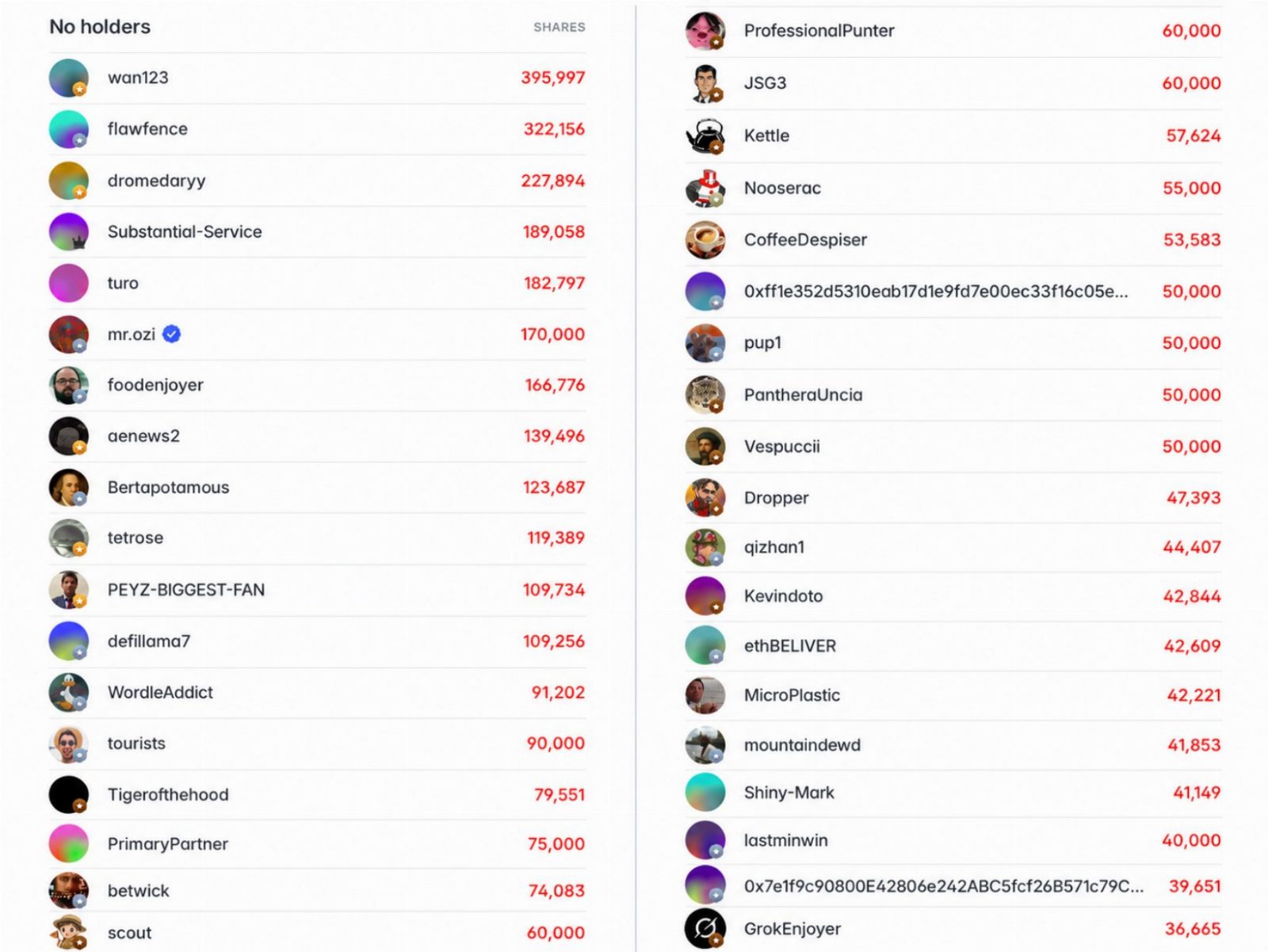
- 7 replies
- 1 reposts
- 42 likes
- 5K views
-
Why did Harry Kane’s chances of winning the Ballon d’Or jump from 45% to 75% in October?
X news feed by PolyHelper gives you the full context without even leaving Polymarket
It’s that simple1 more in this thread
Want to have same feature in Polymarket interface? Install extension here:
https://chromewebstore.google.com/detail/polyhelper/mebiclnfcnknilfaoanimpaeimjlafmg- 1 replies
- 2 reposts
- 6 likes
- 427 views
-
1,000,000 trades have been made using PolyHelper
We’re incredibly proud of this milestone. Back to building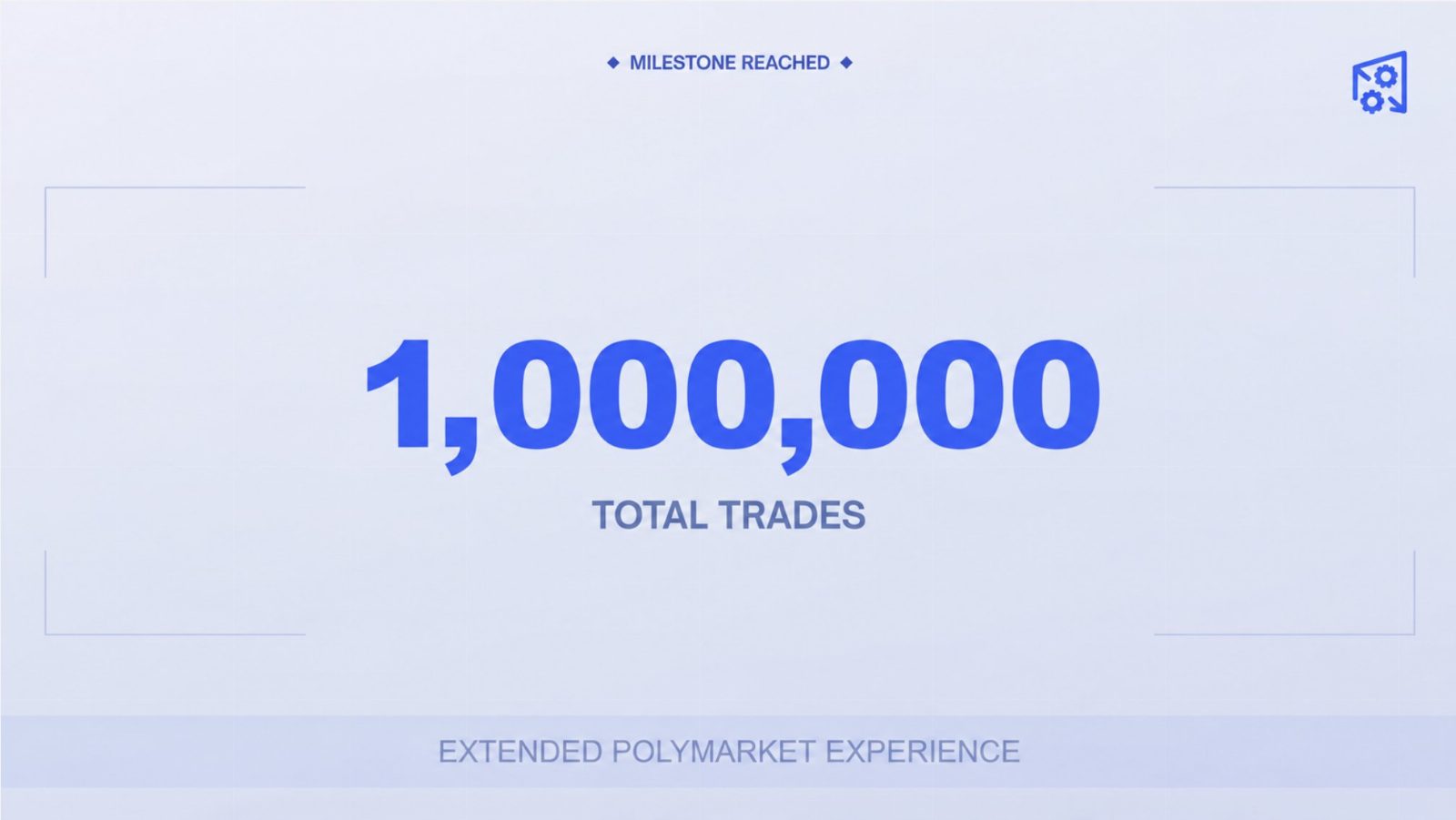
- 3 replies
- 1 reposts
- 20 likes
- 2.8K views
-
All the smart money on Polymarket are now in one market
The Fed decision is today, and traders are pricing an 88% chance of a 25 bps hike
But it looks like smart money are already in consensus...
The top 50 Yes holders have a combined PnL of $16.9M
Meanwhile, the top 50 No holders are at -$11.6M
Looks like no suspense again today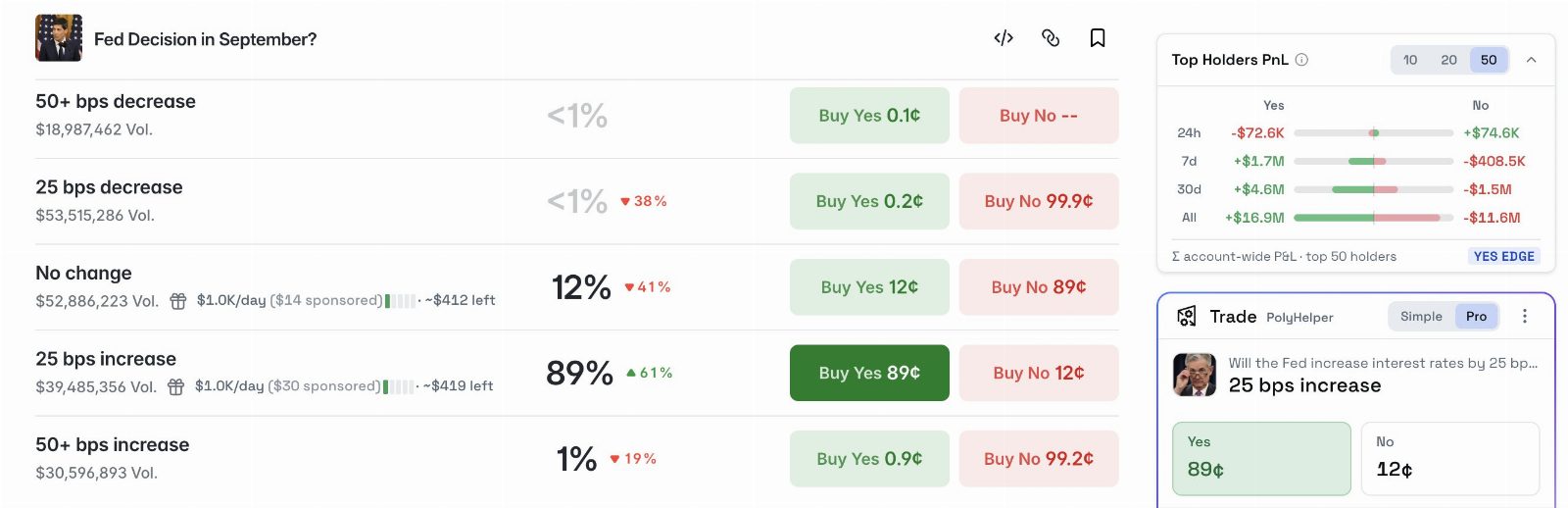
1 more in this thread
Want to have these features in Polymarket interface? Install extension here:
https://chromewebstore.google.com/detail/polyhelper/mebiclnfcnknilfaoanimpaeimjlafmg- 6 replies
- 41 likes
- 4K views
-
That rare case when a polymarket is almost at consensus (90%), but smart money are still split
For the Clarity Act polymarket, Top holders PnL shows a pretty unexpected picture:
$6.1M combined PnL for the top 50 Yes holders
$6.3M combined PnL for the top 50 No holders
No holders probably just don’t believe it actually happens this year, while Yes holders still see +EV at current prices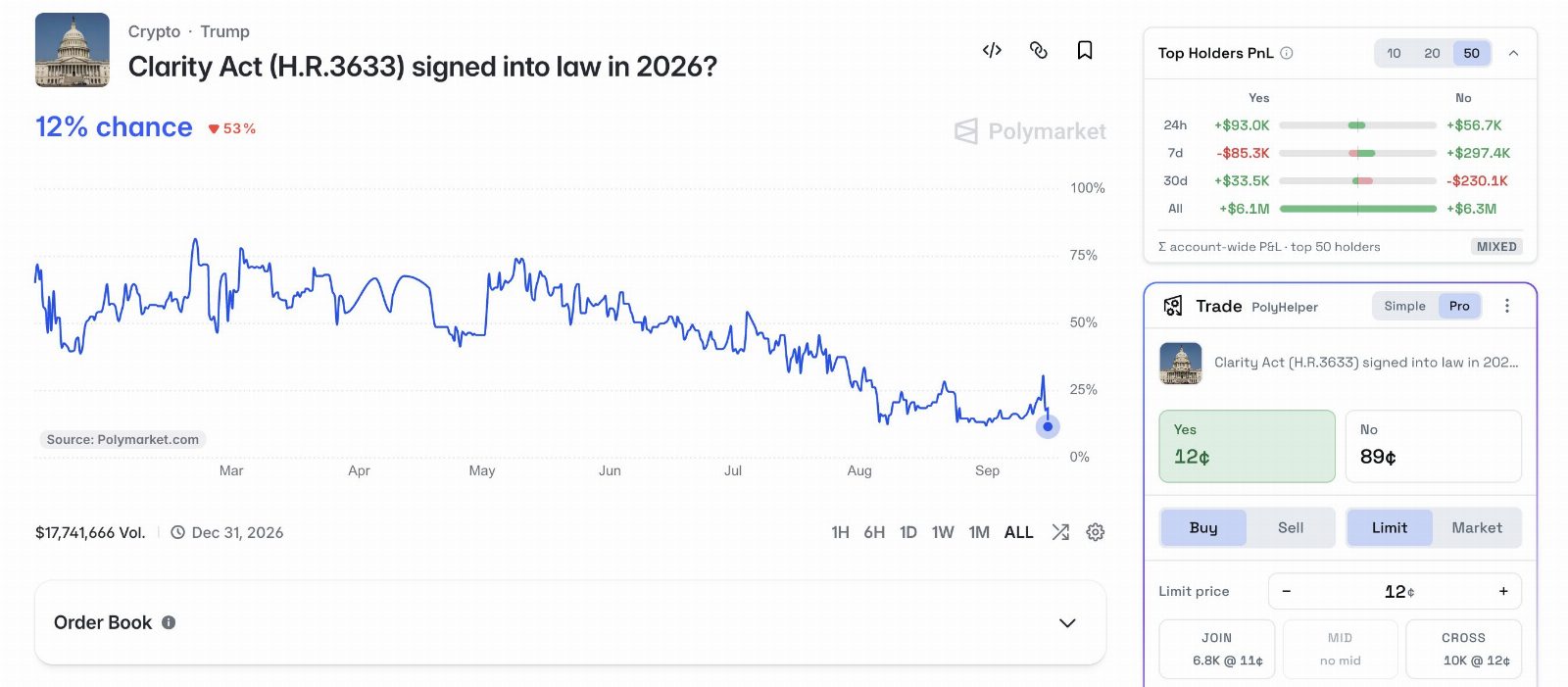
1 more in this thread
Want to have these features in Polymarket interface? Install extension here:
https://chromewebstore.google.com/detail/polyhelper/mebiclnfcnknilfaoanimpaeimjlafmg- 2 replies
- 18 likes
- 685 views
-
Fed Decision in September is one of the most popular polymarkets right now
PolyHelper makes it easier to analyze with two features:
• X news feed
The latest news from key sources on X, right inside the Polymarket interface
• Macro intelligence
Historical rate changes and other relevant macroeconomic indicators
Everything you need for research in one place1 more in this thread
Want to have these features in Polymarket interface? Install extension here:
https://chromewebstore.google.com/detail/polyhelper/mebiclnfcnknilfaoanimpaeimjlafmg- 4 replies
- 16 likes
- 719 views
-
Tweets market feature successfully predicted how many times Elon Musk would post
August 24, 8:35 AM UTC:
• 320–339 posts trading at 37c
• Tweets feature projected 331 posts
August 25, 4 PM UTC:
• 320–339 wins
• 37c → 100c (2.7x)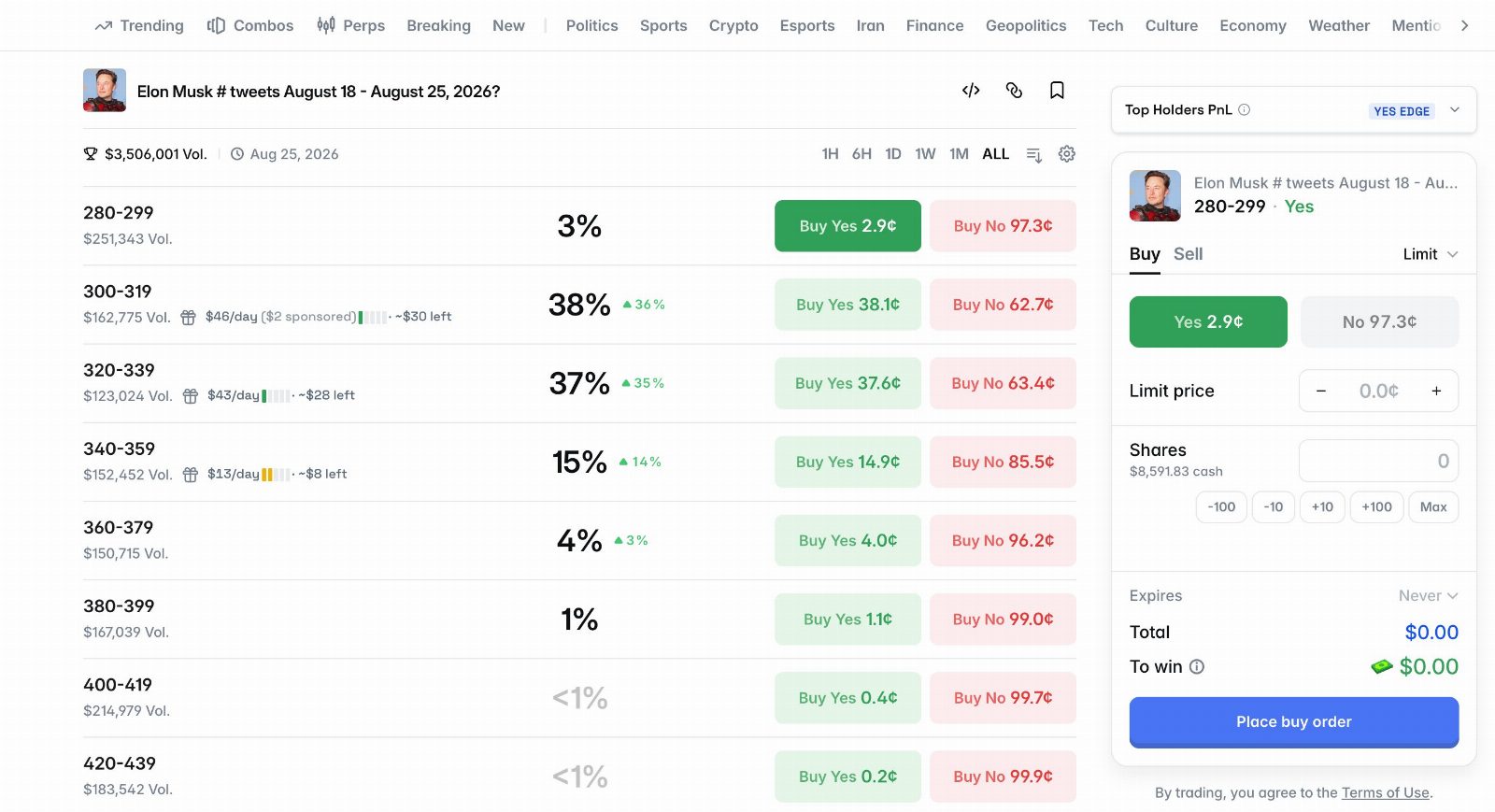
1 more in this thread
Want to have this feature in Polymarket interface? Install extension here:
https://chromewebstore.google.com/detail/polyhelper/mebiclnfcnknilfaoanimpaeimjlafmg- 4 replies
- 2 reposts
- 29 likes
- 1.2K views
-
Summer is about to end, which means the biggest football leagues are back
With PolyHelper Sports feature, you can check league tables without leaving Polymarket
• Premier League
• La Liga
• Bundesliga
• Ligue 1
• And lots more
And it’s not just football, the Sports feature covers almost every major sport1 more in this thread
Want to have this feature in Polymarket interface? Install extension here:
https://chromewebstore.google.com/detail/polyhelper/mebiclnfcnknilfaoanimpaeimjlafmg- 5 replies
- 1 reposts
- 24 likes
- 1.1K views
-
We’re back on the Polymarket Builder Leaderboard
#7 by all time volume. And we’re not stopping here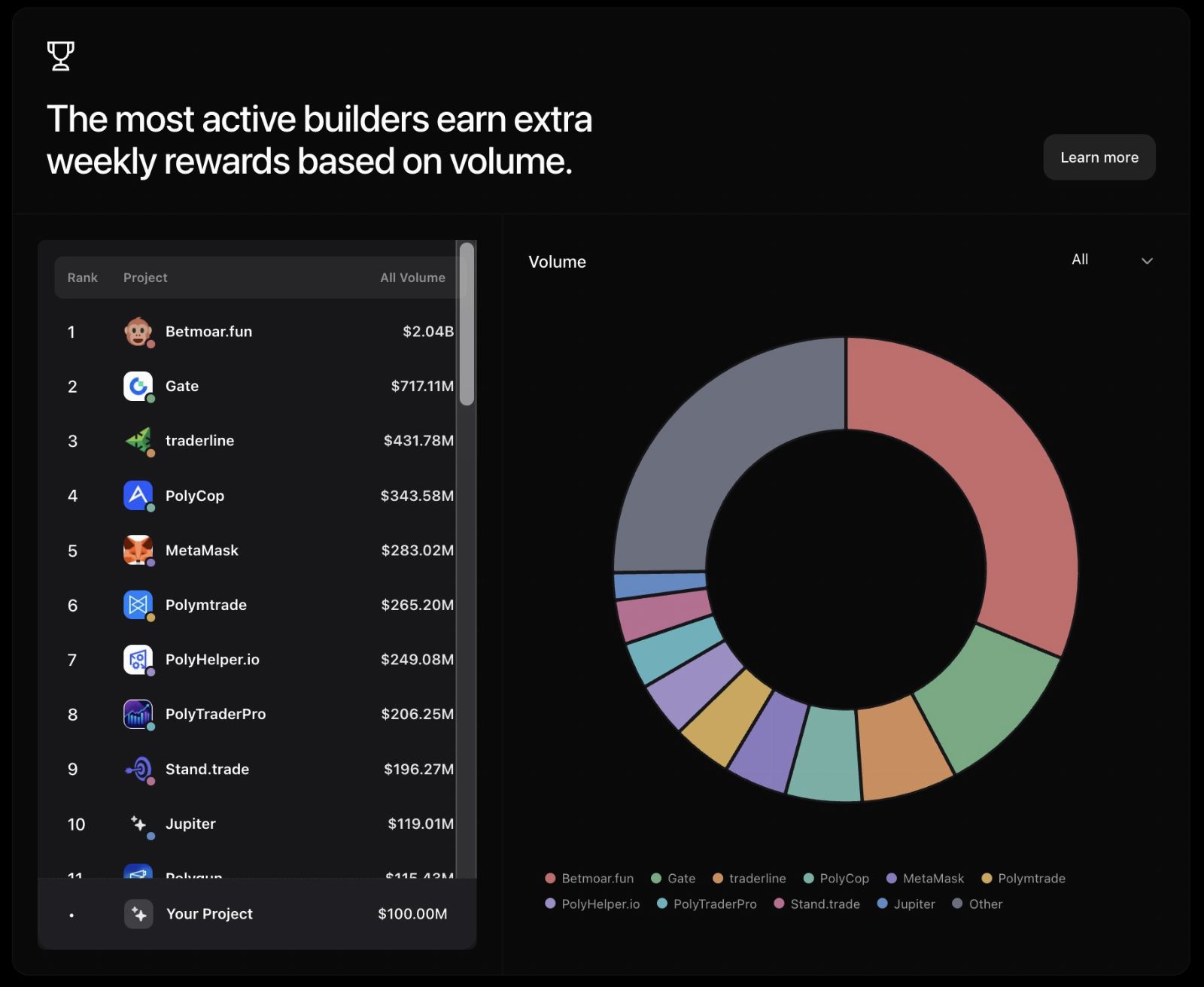
- 4 replies
- 23 likes
- 3.3K views
-
who has more aura on @Polymarket ?
@saurav_tweets launched a tool just for fun
the current top 3 are:
@Poly_Helper
@betmoardotfun
@gondorfi
the leaderboard is based on your votes- 9 replies
- 2 reposts
- 51 likes
- 2.1K views
-
How to make money on @Polymarket (no-brainer version)
- First, install the @Poly_Helper extension.
- Search for markets that have fast resolution (less than 24 hours, or pure sports gambling).
- Only take markets that are around 50-50.
- Check the Top Holders’ PnL and see which side the heavy money is on.
- Simply follow the smart money (these wallets have already analyzed the market and the probabilities , that’s why they’re profitable).
- Do this repeatedly for at least 100 trades (100 markets).
- Your win rate after 100 trades should be around 60–70%, sometimes better.
- Following Top holders won’t give you a 100% win rate , trust me. They just have a better win rate than us.
Don’t just trade a few markets and then stop. There is no edge if you do that.
It’s pure gambling, but smarter.
Compared to traditional betting sites, you can’t see top holder PnL or smart money. That’s why Polymarket has an edge over all betting sites.
Make sure you have enough money for 100 markets and adjust your bet size accordingly.
Why only trade around 50% markets?
You only need to be slightly better than 50% (a few percent) to break even, so that’s why we choose these markets.
Shoutout to @0xd1namit for doing an amazing job here.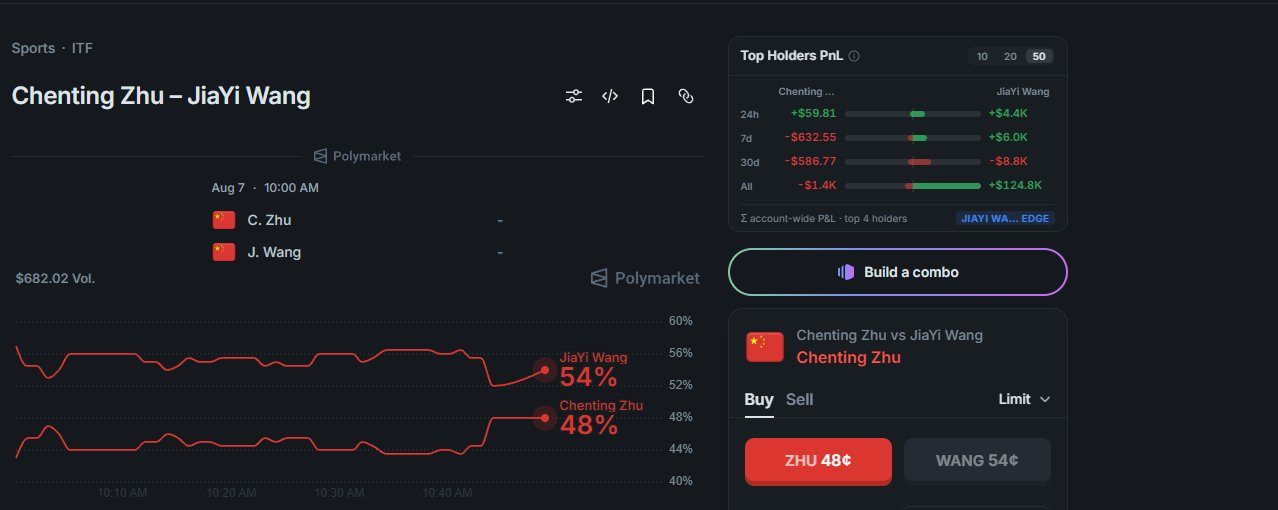
- 6 replies
- 2 reposts
- 19 likes
- 733 views
-
v1.0.0 | New trading interface by PolyHelper
Simple version
• Drift protection (cancels your order if the price changes after you confirm the transaction)
Pro version
• Post only mode for limit orders (cancels an order if it would execute immediately after the transaction is signed)
• Fill type for market orders: Fill available, Full or cancel
• Max price for market orders (sets the highest price your order can execute at)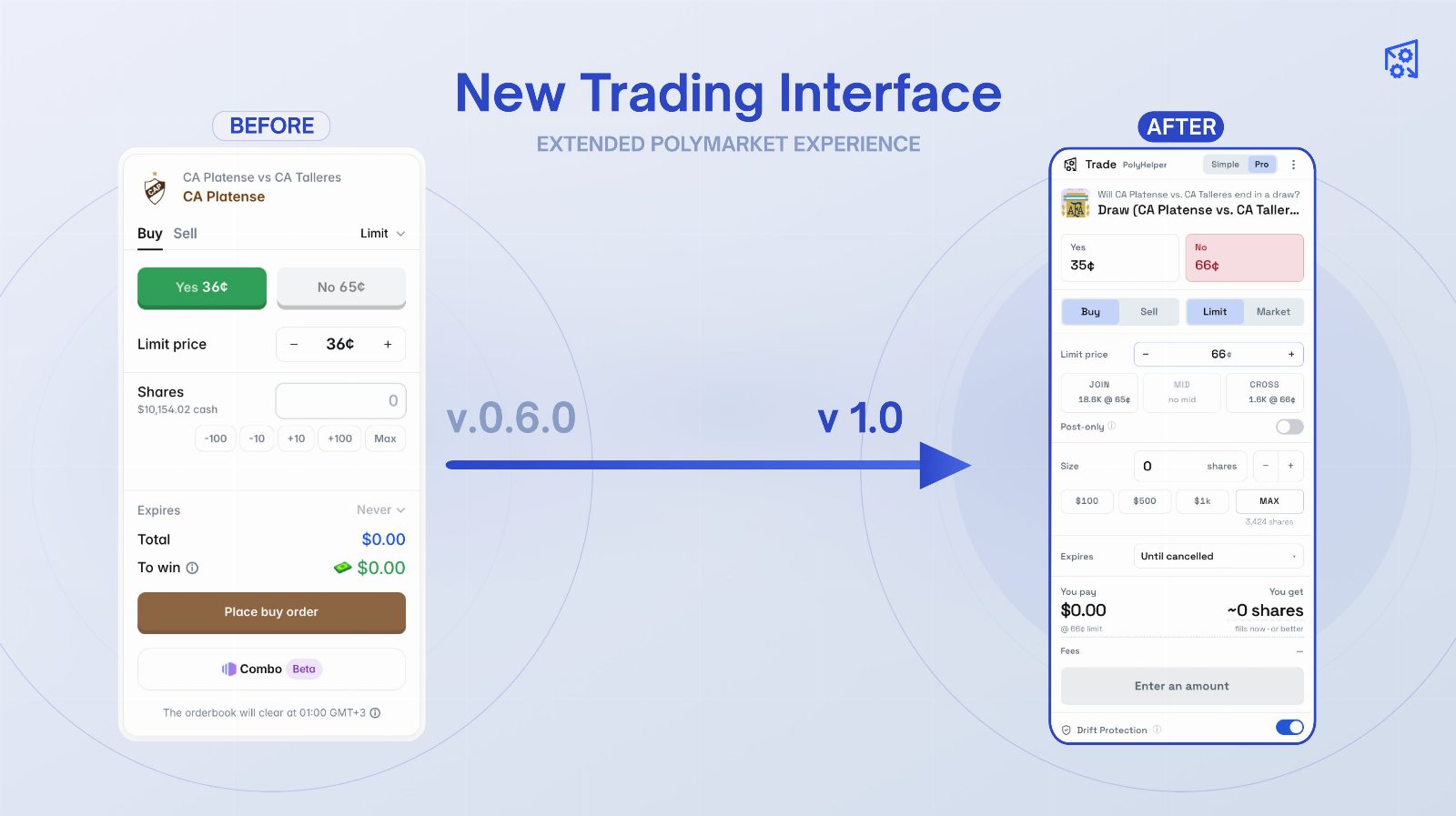
1 more in this thread
Update your Polymarket interface with new features in 30 seconds:
https://chromewebstore.google.com/detail/polyhelper/mebiclnfcnknilfaoanimpaeimjlafmg- 7 replies
- 3 reposts
- 28 likes
- 5.5K views
Poly Helper Reviews & Comments
No reviews yet. Be the first to share your experience.
Poly Helper alternatives
Other Polymarket tools that do a similar job. Compare and pick what fits your workflow.
-
Compare
Tailgate
Copy sharp bettors' plays at the best price across prediction markets, and get paid when…
-
Compare
Polymarket
Traders buy and sell shares on real-world event outcomes, earning payouts when their pred…
-
Compare
PolyGun
Traders use PolyGun to trade Polymarket positions and automatically copy other wallets di…
-
Compare
PolyEdge
PolyEdge gives developers low-latency Polymarket mempool data and fee-adjusted on-chain a…




Recommended reading
In-depth guides for Browser Extensions — get more out of tools like Poly Helper.
-
Tool Reviews
Free Polymarket Open Source Tools and Trading Bots on GitHub
Free Polymarket open source tools and trading bots on GitHub. Datasets, backtesters, copy trading, weather bots, and AI agents, w…
10 min read -
Tool Reviews
Best Polymarket Analysis Tools in 2026: Explorers, Whale Trackers, and Dashboards
See which Polymarket analysis tools spot whale trades, rank top wallets, and chart market flow. Free options, honest drawbacks, a…
8 min read -
Tool Reviews
How to Find Top Polymarket Wallets for Copy Trading (2026)
Find the best Polymarket wallets to copy trade. Use free leaderboards and wallet trackers to spot smart money, read win rates, an…
10 min read


Ready to try Poly Helper?
Open the official site and get started in a few clicks.
Leave a comment