

Traderline
Traderline gives traders a desktop interface for faster order execution and deeper market visibility on Polymarket and Betfair.
Traderline Desktop App For Polymarket And Betfair Trading
What is Traderline?
Traderline is a free desktop trading application for Polymarket and Betfair that gives serious traders a vertical ladder interface, one-click order execution, and risk controls that browser-based platforms do not offer.
Ready to try Traderline?
Open the official site and get started in a few clicks.
Traderline Overview
Traderline is a desktop application that puts a professional trading terminal on top of Polymarket. It does not replace the exchange or hold your capital. Funds stay on Polymarket, and the software gives you a faster, more visual way to trade prediction market contracts.
The tool targets serious traders who treat prediction market activity as a repeatable process. Scalpers who enter and exit positions in minutes. People managing multiple markets at once. Anyone who wants order book depth and one-click actions instead of clicking through web forms.
Getting started takes a few steps. You create a Polymarket account, deposit USDC through official channels, export your signer key from the Magic login page, and paste it into Traderline. The app stores the key locally on your device. From there you browse markets and trade through the interface.
The core of the experience is a vertical ladder that stacks bids and offers close together for rapid scanning. You can place, edit, or cancel orders with single clicks. A unique NET button handles position netting and quick adjustments that no other Polymarket tool offers. This setup excels for scalping short-term swings in event contracts where seconds matter.
Integrated charts update live with price, volume, and depth data. A market browser lets you scan available events, filter by category, and jump between contracts without losing context. You can keep several ladders or grids open at once when following correlated markets or running parallel strategies.
Built-in calculators handle dutching across multiple outcomes to spread risk and target consistent returns. Green-up and red-up functions lock profits or limit losses as markets move. Automated stop loss and take profit orders attach to positions, and bankroll tracking helps maintain discipline during fast-moving sessions.
What sets Traderline apart is raw speed and the ladder feel. The browser feels slow once you trade through a desktop terminal built for precision. The same mechanics that sports exchange traders have relied on for years now apply directly to Polymarket yes or no contracts. That transfer of skills is what makes the tool click for experienced traders who want to cut execution friction and gain an analytical edge in prediction market trading.
Traderline Key features
-
Vertical Ladder with NET Button
The central trading view stacks bids and offers vertically so price levels are easy to scan at speed. Orders can be placed, edited, or cancelled with a single click directly on the ladder, and the NET button handles position netting in a way users consistently describe as unavailable in other tools.
-
One-Click Order Execution
Orders flow straight from the ladder or grid without extra confirmation steps. Queue position indicators show where pending orders stand in the matching process, which matters when seconds separate a filled order from a missed one.
-
Live Charts and Market Browser
Integrated charts update in real time with price and volume data alongside order book depth. A market overview screen lets traders scan events, filter by category, and move between contracts without losing their place.
-
Multi-Market View
Several ladders or grids can stay open at once, with layouts adjusted to personal preference. Traders following correlated events or running parallel strategies across different markets can switch focus without closing and reopening windows.
-
Automated Risk Controls
Stop loss and take profit orders can be attached directly to positions. A demo mode lets traders test strategies with simulated capital before using real funds, and built-in dutching calculators distribute stakes across multiple outcomes to hit a target return.
Traderline Fees
-
Free access Traderline is free to use with no subscription, which removes any financial barrier to testing the software.
How to use Traderline
-
Download the app
Pick the Polymarket or Betfair application from the Traderline site. The two stay separate so you install only the one you need.
-
Create a Polymarket account
Sign up on Polymarket through the official website if you do not have one yet. You need a qualifying account before you can connect it to Traderline.
-
Deposit USDCe to your account
Add USDCe to your Polymarket balance through official deposit channels. Funds stay on Polymarket the entire time you use Traderline.
-
Export your signer key
Open the Magic login page on Polymarket and export your signer key once. This key lets Traderline communicate with your Polymarket account.
-
Paste the key into Traderline
Copy the exported key and paste it into the Traderline app on your machine. The app stores it encrypted on your device only and never sends it to Traderline servers.
-
Browse available markets
Use the market browser to scan events and filter by category. Charts and volume data update live in the same view as you move between contracts.
-
Open ladders or grids
Click a contract to open its vertical ladder or grid view. You can keep several open at once if you follow correlated events or run parallel strategies.
-
Place orders on the ladder
Click directly on a price level to place a bid or offer. Edit or cancel orders with single clicks on the same ladder.
-
Use the NET button
Press the NET button to net your position and make quick adjustments. Users describe this feature as unavailable in any other trading software.
-
Apply stake tools and dutching
Use the built-in calculators to spread stakes across outcomes or hedge exposure. Green up and red up functions let you lock profits or cut losses fast.
-
Set stop loss orders
Attach automatic stop loss and take profit orders to your positions on supported exchanges. Bankroll tracking helps you keep position sizes in check.
-
Practice in demo mode
Switch to virtual mode to test strategies with simulated capital before you risk real funds. This lets you learn the interface without financial pressure.
Traderline Screenshots

Traderline Review
Pros
- It executes orders faster than a standard web browser.
- Traders can apply their skills across both supported platforms.
- The software is free to download and use.
- The vertical ladder stacks price levels close together for quick scanning.
- The NET button adjusts and nets positions in a single click.
- Live charts display real-time odds and volume data.
- A market browser lets users filter events by category and switch contracts.
- Local encrypted storage saves users from repeated password entries.
- Traders can place and cancel orders directly on the interface.
- Queue position indicators show users where their pending orders stand.
- Users can keep multiple market ladders open at the same time.
- Built-in calculators distribute stakes across several outcomes to hedge risk.
- Green up and red up functions lock in profits or limit losses.
- Users can attach automatic stop loss and take profit orders to their trades.
- A demo mode lets users practice strategies with simulated capital.
- Background updates keep matched volume and live stats current.
- The application stores private keys directly on the local device.
- User funds stay entirely on the official Polymarket platform.
- Discord and Telegram channels provide direct support.
Cons
- Traderline is desktop only with no mobile app.
- The interface has a learning curve that slows down complete beginners.
- Polymarket setup requires manually exporting and pasting a private signer key.
- Polymarket and Betfair each need a separate application download.
- Automated stop loss and take profit orders only work on supported exchanges.
- A connectivity drop during volatile periods can disrupt open positions.
Is Traderline safe & legit?
Mythical Technologies Lda, a Portuguese software company with roots in exchange trading tools since 2011, built and maintains Traderline. The Polymarket community receives it well, with experienced traders praising the execution speed and the unique NET button on the vertical ladder. No public reports of fund loss or security failures tied to the software exist, though standard risks around device security and fast market volatility remain.
X account intel @TraderlineApp
-
Based in Portugal
-
Joined X May 2026 3 months ago
-
Username changes Never renamed
-
Signup source Portugal App Store
Public profile signals from X. Use as one input alongside other due-diligence.
Wallet blacklist scan checked Sep 12, 2026
- MetaMask Not flagged
- Phantom Not flagged
- ScamSniffer Not flagged
- EtherAddressLookup Not flagged
- Keplr Wallet Not flagged
Domain traderline.com checked against public crypto wallet blacklists.
Traderline FAQ
What is Traderline?
Does Traderline hold my funds?
How do I connect Traderline to Polymarket?
Is Traderline free?
Who should use Traderline?
Traderline Updates
-
 And if someone sends you a set of configurations you want to use, this is how easy it is to import them.
Simplicity is the ultimate sophistication.- 2 likes
- 90 views
-
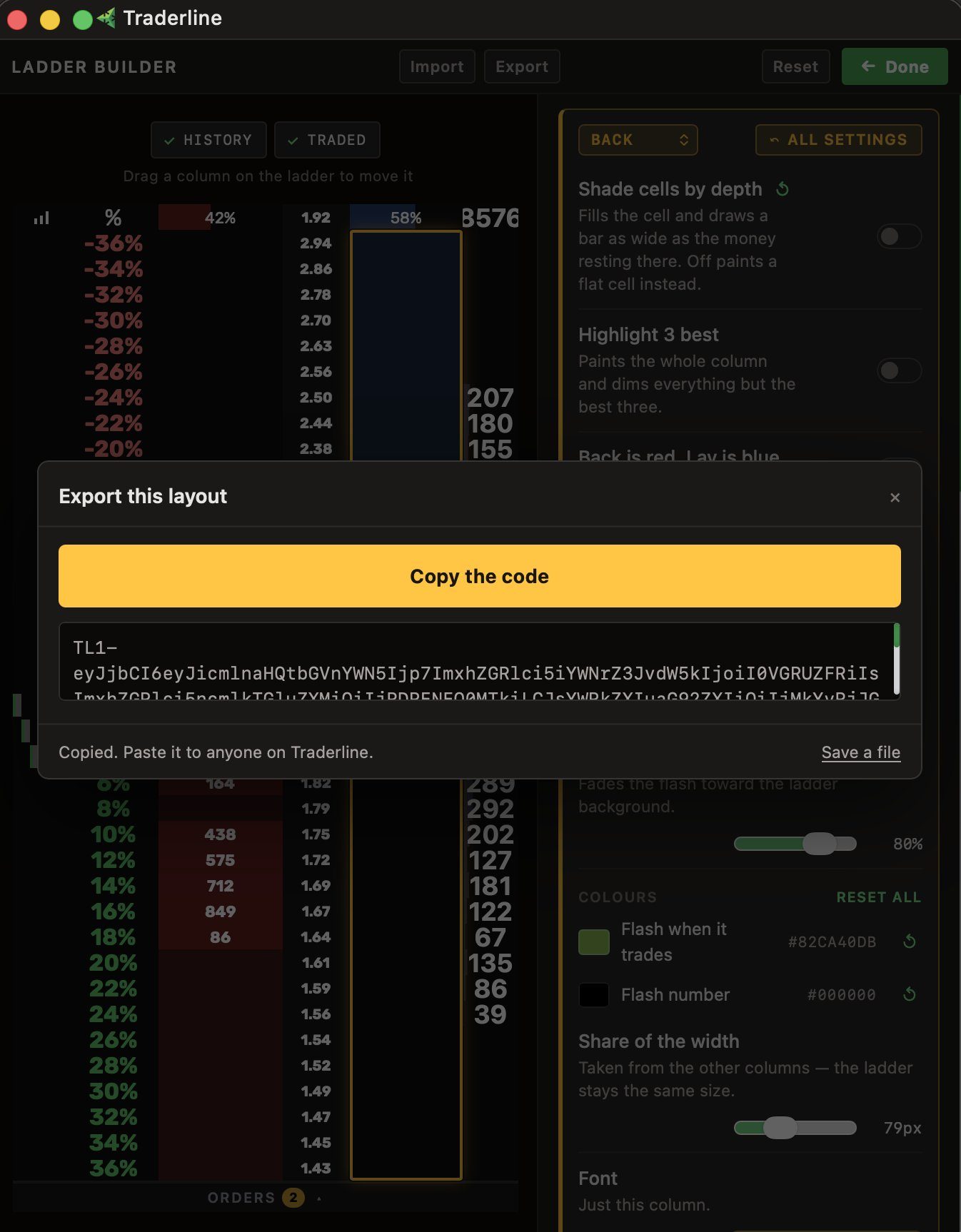
Your configurations are shareable with one click.
- 1 likes
- 49 views
-
Everything is customisable. And when we say everything, we mean everything.
- 1 likes
- 42 views
-
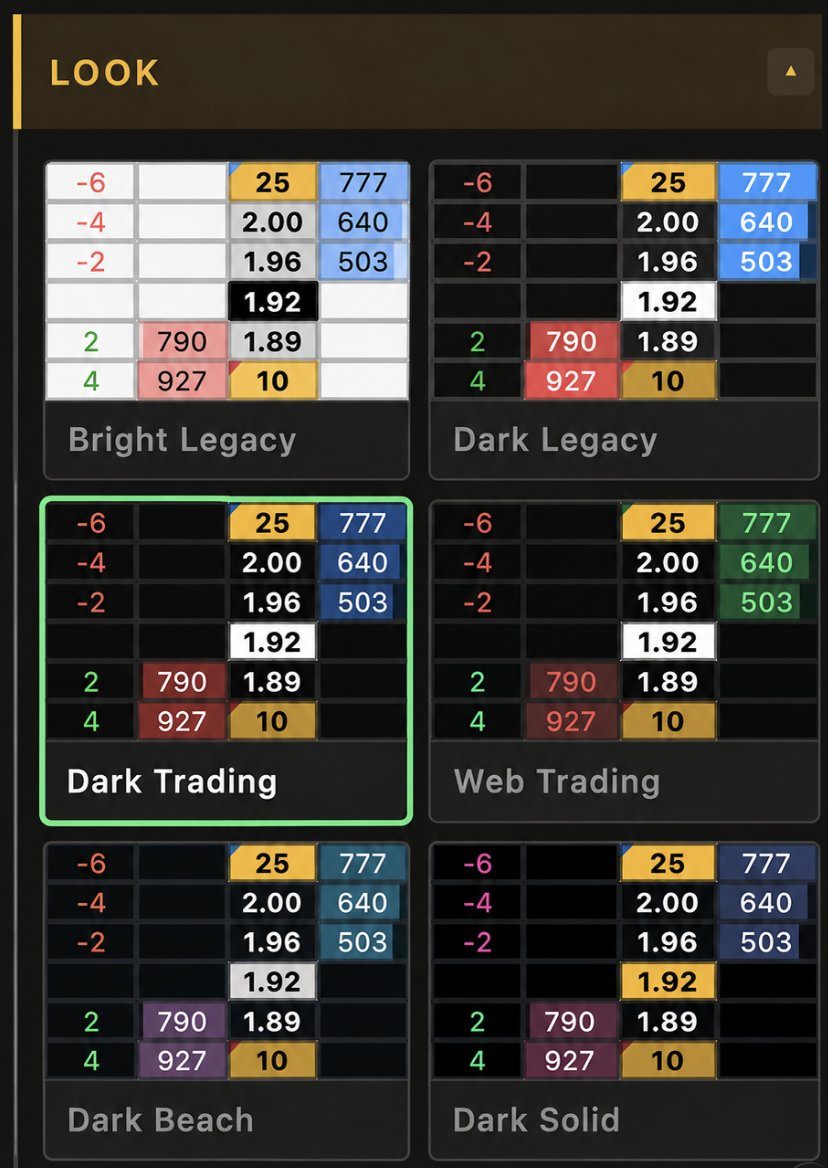
Six presets to start building from.
- 33 views
-
This is how easy it is to build your own ladder
- 1 likes
- 37 views
-
The biggest innovation since trading ladders first hit the market is here: the Ladder Builder.
This is what it means to build your own ladder.
Available now on Traderline Polymarket.
- 1 reposts
- 3 likes
- 531 views
-
🚨 TRADERLINE POLYMARKET: BIGGEST UPDATE SINCE LAUNCH RELEASED 🚨

1 more in this thread
🆕 NEW
⚽ Football & Soccer side panel
A live odds chart that follows your cursor, the current match score, and each team's liquidity, orders and profit/loss. All in one place, beside the ladder.
🎾 Tennis live grid
A set-by-set score matrix with game and tiebreak detail, live scores and player names, right next to the market.
🔴 Live match data
Live scores and match events now appear inside tennis and football markets as they happen.
🤝 Draw ladder identifier
The Draw ladder is now clearly identified in football match odds markets.
🛡️ Logos
Team logos now show across the new panels and markets.
🔧 IMPROVED
• Faster login, quicker startup, lighter app
• Close-with-position warning: we check with you before closing a ladder that still holds an open position
• Your Taker Rebate tier now shows in My Predicts
• Smoother ladders during heavy trading bursts
• Steadier connection indicator
• Refined minimizing behavior and a subtle grey border for a cleaner look- 1 replies
- 2 likes
- 146 views
-
🚨 July promos are now live: https://traderline.com/promotions

- 2 likes
- 196 views
-
The July leaderboard is now live 🔥
Only on Traderline for Polymarket
- 1 reposts
- 7 likes
- 1.3K views
-
We’ve just released the fastest ladder in the universe ⚡️
- 6 replies
- 10 likes
- 355 views
-
we’ve just released the fastest ladder in the universe. Now available on Traderline Polymarket.

- 3 replies
- 1 reposts
- 6 likes
- 1.2K views
-
Traderline Sonar is now live on @Polymarket.
A new page in sports trading history has been written👇
https://traderline.com/sonar
- 39 replies
- 1 reposts
- 28 likes
- 1.7K views
-
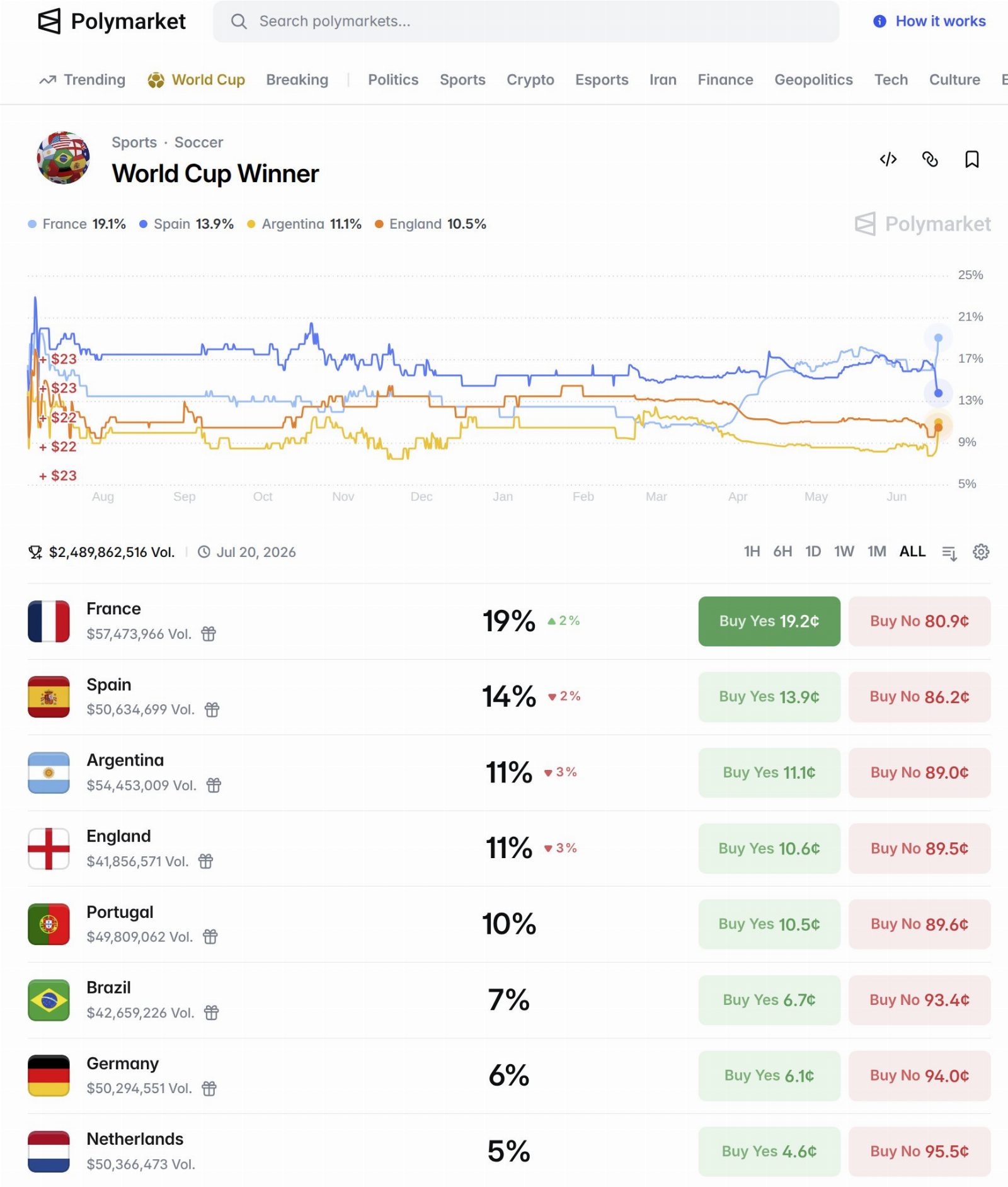
Polymarket about to hit $2.5bn traded on the World Cup winner. Betfair exchange only approaching £12m.
- 17 replies
- 10 reposts
- 140 likes
- 40.6K views
-
🆕 Traderline added to #polymartapp
Traderline gives traders a desktop interface for faster order execution and deeper mark…
Support @TraderlineApp & @polymartapp — like & retweet 🙏
#Traderline #Polymarket #TradingBots #PortfolioTrackers- 1 reposts
- 7 likes
- 417 views
-
🚨 traderline for @Polymarket is live
launched days ago. already top 10 polymarket apps
not just another app. the pro stack, no paywall
2,500 USDC on the table for june.
- 5 replies
- 1 reposts
- 7 likes
- 1K views
-
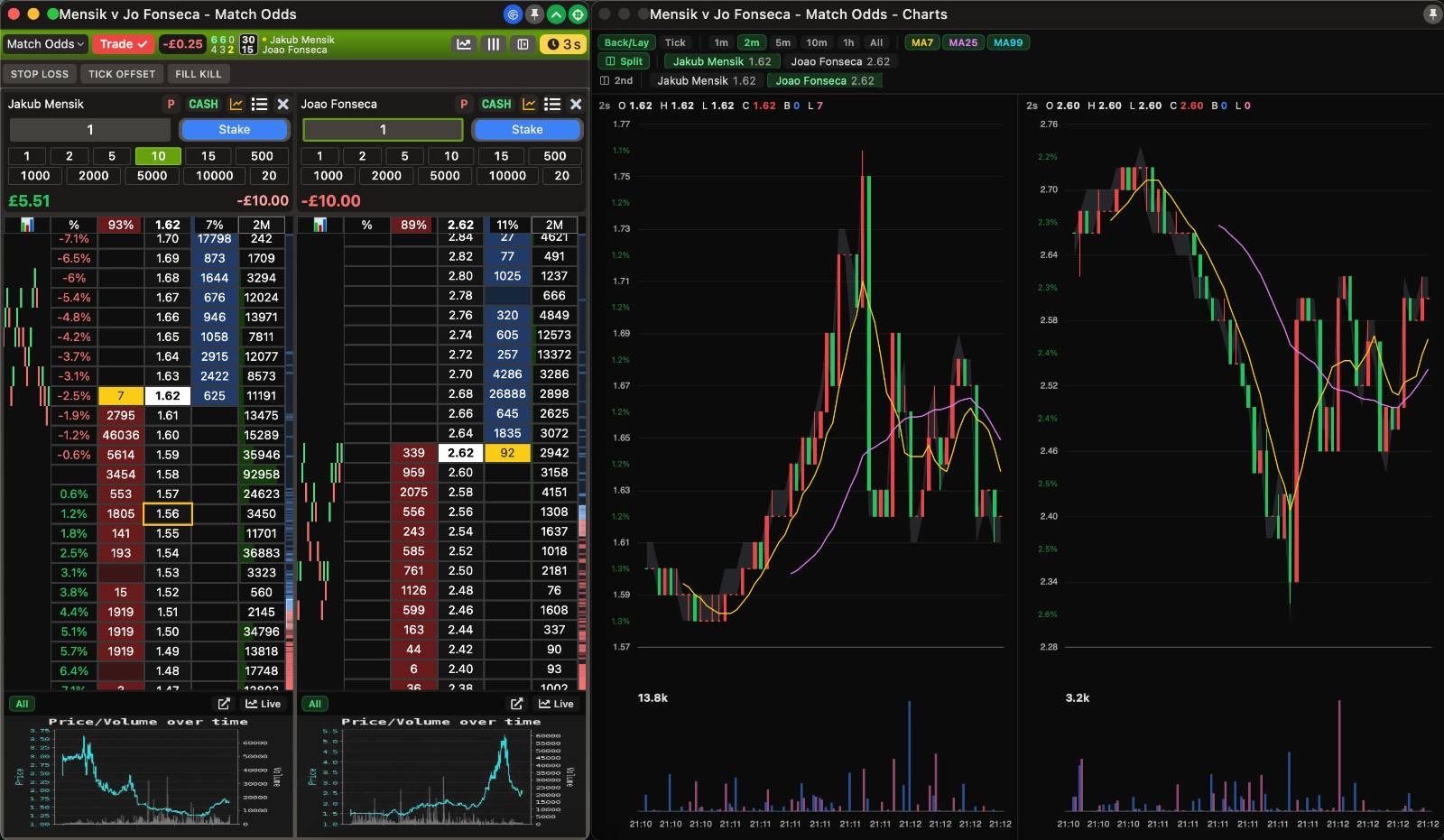
🚨JUST IN: new release dropped today
- 1 reposts
- 3 likes
- 225 views
-
🚨 TRADERLINE BETFAIR UPDATE: We’ve just shipped a major Traderline Betfair update, bringing together months of feedback, fixes, and improvements.
- Bug fixes
- UI & Settings changes
- New graphs (& more on the way)
- 188 views
Traderline Reviews & Comments 1
Leave a comment
Traderline alternatives
Other Polymarket tools that do a similar job. Compare and pick what fits your workflow.
-
Compare
Kreo
Kreo copies proven Polymarket and Kalshi wallets in real time, so you ride smart money tr…
-
Compare
Axiom Trade PolyMarket
Traders on Axiom can now take positions on real-world events without leaving the terminal…
-
Compare
Future News
Traders who want to turn news headlines into instant yes-or-no bets on real-world events…
-
Compare
ProTrade
Sports traders use ProTrade to trade live Polymarket markets with back and lay ladders an…




Recommended reading
In-depth guides for Trading Terminals — get more out of tools like Traderline.
-
Tool Reviews
Best Polymarket Trading Bots 2026: Copy Trading & Sniper
Five Polymarket trading bots tested for 2026. Compare copy trading speed, sniper orders, fees after the March rate change, setup…
29 min read -
Tool Reviews
Best Polymarket CopyTrading Bot 2026
This breakdown covers the five best Polymarket bots available right now: PolyCop, Kreo, TradePolyBot, PolyGun, and a forward-look…
14 min read -
Tutorials
The Ultimate Guide to Copy Trading on Polymarket
Finding a profitable wallet is the easy half. This walks through picking one worth following, then setting the sizing, filters an…
6 min read


Ready to try Traderline?
Open the official site and get started in a few clicks.
A big advantage to make the most out of polymarket, I get why they were #1