

Polymarket CLI
Developers and AI agents get full terminal access to Polymarket markets, order books, trades, and on-chain operations through a single Rust-based CLI.

Polymarket CLI: Official Terminal Tool for Prediction Market Trading
What is Polymarket CLI?
Polymarket CLI is the official Rust-based command line tool from the Polymarket team, giving developers, traders, and AI agent builders full terminal access to browse markets, place trades, manage positions, and pipe live prediction market data into scripts or automation workflows.
Ready to try Polymarket CLI?
Open the official site and get started in a few clicks.
Polymarket CLI Overview
Polymarket CLI is the official command line tool for the Polymarket prediction market platform, written in Rust for fast, low-overhead execution. It gives you full access to Polymarket from the terminal, covering market browsing, order placement, portfolio tracking, and on-chain contract operations without ever opening a browser.
The tool is built for two kinds of use at once. Run a command and read the output as a formatted table, or add a flag and get clean JSON output you can pipe into scripts, analysis tools, or AI agents. Read-only commands like market search, order book queries, and price history require no wallet setup at all. Trading and on-chain actions use a locally stored private key that never leaves your machine.
On the research side, you can list and filter all active markets, pull bid-ask spreads, midpoints, last trade prices, and price history across custom intervals, and check open interest or holder counts for any condition. On the trading side, you can place limit orders and market orders, cancel individual or batch orders, and manage your full position from a single command. For on-chain work, the CLI handles splitting and redeeming conditional tokens, USDC approvals, and asset bridging with status checks, all on Polygon.
Portfolio commands pull open positions, closed positions, trade history, PnL, and leaderboard data for any wallet address. An interactive shell mode keeps command history available so extended research sessions stay fast without re-entering context each time.
What separates this from browser-based access is the composability. One line can pull every active market and pipe the questions into another tool. A script can query prices, place a trade, and log the result without any web dependency. That makes it a practical fit for trading bot development, arbitrage automation, quant research workflows, and anyone building AI agents that need to query or act on live prediction market data. It runs on macOS and Linux, with source builds available for other environments.
Polymarket CLI Key features
-
Market Research Access
Users can list, filter, and search active or closed markets by tags or keywords with no wallet setup required. Metadata like prices, volumes, and liquidity loads immediately after installation.
-
Order Book Queries
Real-time bid/ask spreads, midpoints, last trades, and price history across custom intervals are available from the terminal. Users can also pull batch prices for multiple tokens in a single command.
-
Trading Operations
Limit orders, market orders, and batch placements run through single commands with support for post-only flags and various time-in-force options. Order creation, cancellation, and management all go through user-signed credentials.
-
Portfolio and PnL Tracking
Users pull open positions, closed positions, trade history, portfolio value, and leaderboard data for any wallet address. On-chain metrics like open interest, holder counts, and volume are included.
-
JSON Output and Scripting
Every command switches between table view and JSON mode with a single flag, making output easy to pipe into scripts, jq, or AI agents. Error handling stays consistent across both modes for reliable automation.
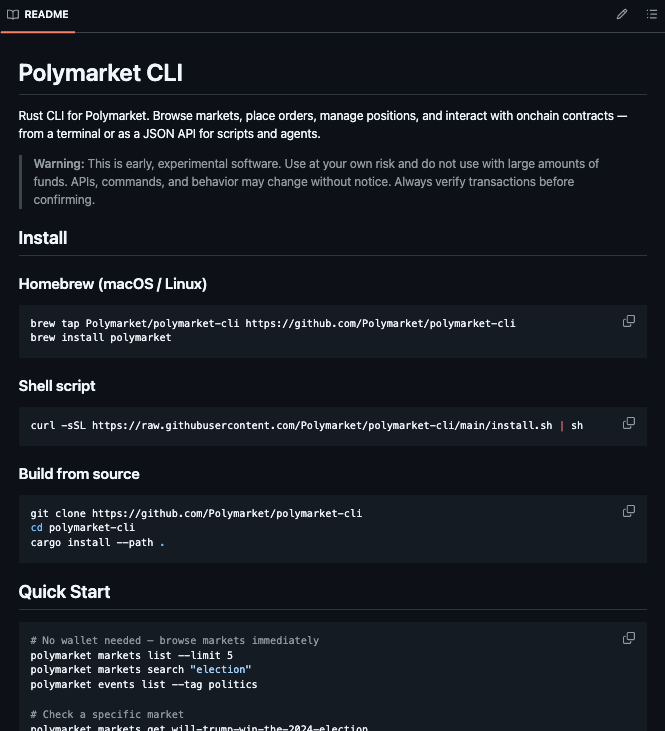
Polymarket CLI Screenshots

Polymarket CLI User Reviews
-
🚨BREAKING: Polymarket just open-sourced their official Rust CLI and it gives developers full programmatic access to the entire prediction market browse trade manage positions and pipe live data into scripts and AI agents all from the terminal.
View on X ↗
Here is what you can do with it right now:
→ Search and browse every active market instantly with no wallet needed
→ Check live order books bid ask spreads midpoints and price history across any time interval
→ Place limit orders and market orders directly from the command line with a single command
→ Cancel individual orders batch orders or your entire open position in one shot
→ Check your portfolio value open positions closed positions and full trade history for any wallet address
→ Pull the monthly and weekly PnL leaderboard with one command
→ Pipe any output to JSON for scripts and agents with the o json flag
→ Split USDC into YES/NO conditional tokens on chain and redeem winning positions after resolution
→ Bridge assets in from other chains and check deposit status directly from the CLI
→ Run an interactive shell with command history for faster research sessions
Every read command works with zero wallet setup so you can start researching and scripting against live market data before you connect a single key.
MIT License. 100 Open Source. -
Polymarket open sourced a full trading terminal built in Rust and nobody is talking about it.
View on X ↗
Its called polymarket cli and it covers everything from market discovery limit orders market orders batch orders portfolio tracking on chain contract operations and bridging.
JSON output on every single command.
Heres what that means in practice:
polymarket o json markets list limit 100 | jq .[].question
Every market on the platform. Piped into whatever youre building. In one line. -
The guy made POLYMARKET CLI a console tool for working with Polymarket directly from the terminal. Its every developers DREAM come true...
View on X ↗
Sooner or later every developer gets tired of the website UI and switches to the console where they can view markets check prices view data in JSON buy and sell positions and much more
And whats more its all completely free...
This is one of those tools that will be easy to integrate with your AI agent
And most importantly it is written in Rust for high speed unlike typical developers who write it in Python which is simply ridiculous
a real tool from a real developer
Is Polymarket CLI safe & legit?
Polymarket CLI is official software made by the Polymarket team, created by developer Suhail Kakar and published under the Polymarket GitHub organization. It is open source, actively maintained, and well received by developers in the Polymarket community. The documentation flags it as early experimental software and advises users to start with small trades and verify transactions manually, which is standard caution for a tool of this type, not a red flag.
Wallet blacklist scan checked Aug 14, 2026
- MetaMask Not flagged
- Phantom Not flagged
- ScamSniffer Not flagged
- EtherAddressLookup Not flagged
- Keplr Wallet Not flagged
Domain github.com checked against public crypto wallet blacklists.
Polymarket CLI Reviews & Comments
No reviews yet. Be the first to share your experience.
Polymarket CLI alternatives
Other Polymarket tools that do a similar job. Compare and pick what fits your workflow.
-
Compare
polymm
Open-source Python market-making and arbitrage bot for Polymarket sports, MIT-licensed, w…
-
Compare
NautilusTrader
Quant teams backtest and trade live with the same strategy code using this open-source Ru…
-
Compare
TickFoundry
Researchers use TickFoundry to download tick-level Polymarket order book history and trad…
-
Compare
Simmer Markets
Simmer Markets gives AI agents a single API to register, trade, and compete across Polyma…



Recommended reading
In-depth guides for Data & APIs — get more out of tools like Polymarket CLI.
-
Tool Reviews
Polymarket Tools Directory: Find Polymarket Ecosystem APP Lists
Compare Polymarket tools directories side by side. Find trading bots, analytics dashboards, whale trackers and APIs, plus safety…
10 min read -
Tool Reviews
Free Polymarket Open Source Tools and Trading Bots on GitHub
Free Polymarket open source tools and trading bots on GitHub. Datasets, backtesters, copy trading, weather bots, and AI agents, w…
10 min read -
Tool Reviews
Polymarket CLI Commands and Features: A Full Guide for Traders, Scripts, and AI Agents
A practical guide to Polymarket CLI commands and features. Install it, browse markets, read order books, place orders, and pipe J…
8 min read


Ready to try Polymarket CLI?
Open the official site and get started in a few clicks.
Leave a comment